TemaFinale24
A company intends to build a to treat waste by burning it and requires a software system service (WIS) that controls a robot (called OpRobot) in order to move the waste.
The structural part of the building
THe Incinerator is situated within a service area (rectangular, flat) as shown in the following picture:
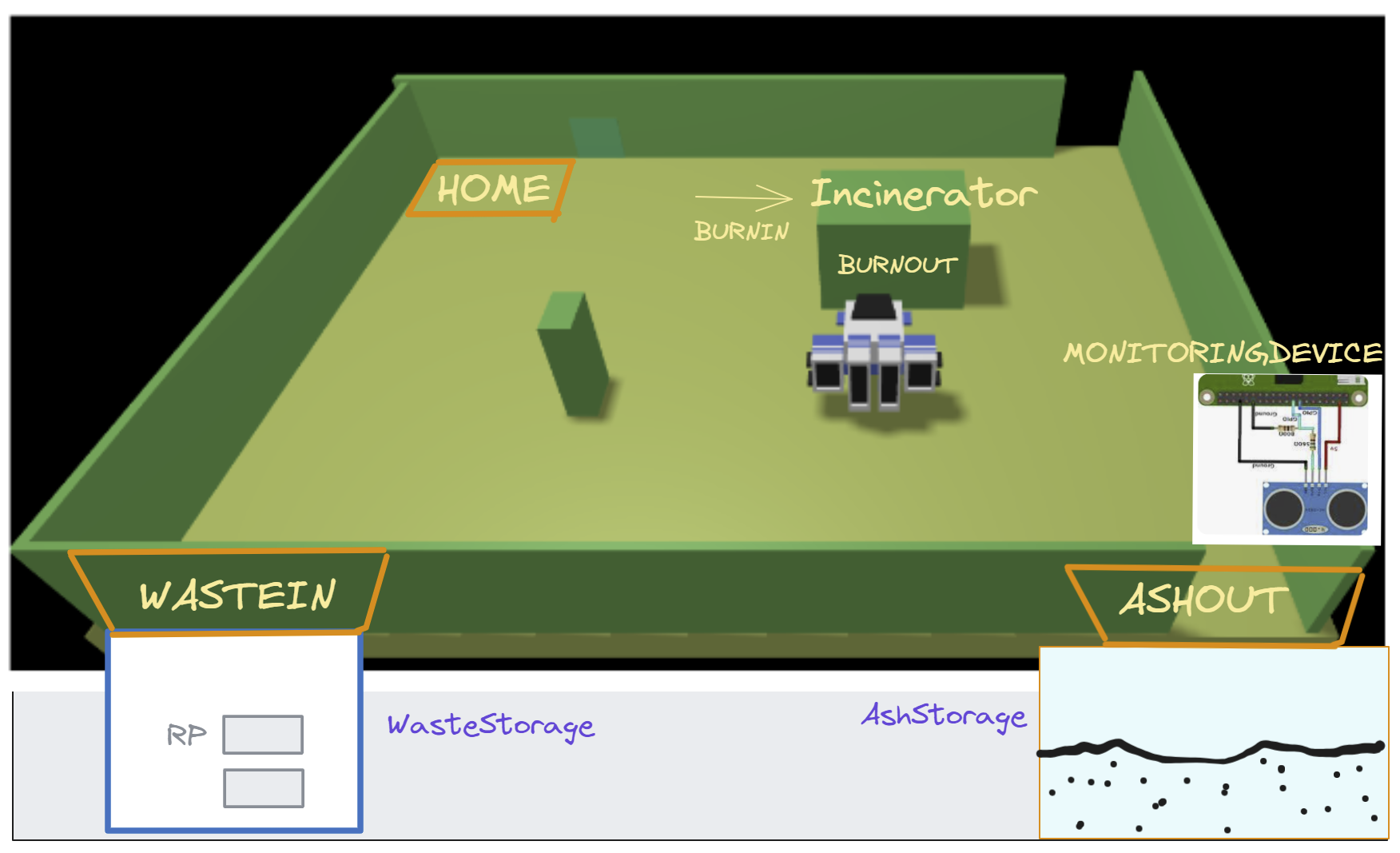
Outside the service area, there are:
a WasteStorage container, devoted to store waste material in the form of Roll Packets (RP). Each RP has a weigth WRP = 50 Kg (approximately);
a AshStorage container, devoted to store the ashes produced by the incineration process. This container can store (approximately) the ashes of
3-4RP.a MonitoringDevice, composed by a a Sonar and a Led working on a RaspberryPi.
The waste can be introduced into the Incinerator through its BURNIN port, while the ash produced by the Incinerator can be extracted using the BURNOUT port.
The service area includes:
a WASTEIN port, that can be used to enter into the service area the RP of waste.
a ASHOUT port, that can be used to move out of the service area the ash produced by the incineration process.
The behavior of the Incinerator
The Incinerator is able to perceive a proper activation command sent by using a wireless (wifi, bluetotth) connection.
The Incinerator can process one RP at the time. The burning process requires (approximately) BTIME seconds.
At the end of a burning phase, the Incinerator emits a (acustic, or other) signal that can be perceived by the OpRobot and by the WIS.
The behavior of the OpRobot
The company provides a DDR robot (and its own control software), that should be used as the physical actuator for the behavior of the OpRobot, that can be listed as follows:
stay in the HOME location when the is no work to do;
if the WasteStorage container is not empty, the AshStorage container is not full, and the Incinerator is not in a burning phase, move to the WASTEIN port. If one of the conditions is not true, wait at HOME, until it becomes true.
get a RP from the WasteStorage container;
move to the BURNIN port and deposit the RP into the Incinerator;
move to the HOME location when the Incinerator is in its burning phase;
move to the BURNOUT port to extract the ash, when the Incinerator has completed a burning phase;
move to the ASHOUT port and deposit the ash into the AshStorage container;
reconsider the point
2(and go back to HOME, if it is the case).
The management of Containers
A new RP is put into the WasteStorage container by some external agent.
The WasteStorage owns a weighing device (Scale) that reports the current weigth af all the RP currently stored into the container. The container can be considered empty when the value of the Scale is (approximately)
0.Onother exetrnal agent provides to remove the ash from the AshStorage container. This actions modifies the value measured by the Sonar of the MonitoringDevice.
The WIS can acquire information from the input devices Scale and Sonar through software supports that must be properly designed and implemented.
The ServiceStatusGUI
The WIS system must also provide a (SSGUI) that must show:
the current state of the WasteStorage, i.e. the number of RP currently stored in it;
the current state of the AshStorage, i.e. an indication of the level of its capacity currently used;
the current state of the Incinerator, i.e. if it burning or not;
the state of the OpRobot, i.e. an indication of its current location in the service area and of the job that it is doing.
The behavior of the MonitoringDevice
The Sonar of the MonitoringDevice is used to measures the level of the ash in the AshStorage container, by measuring the distance between the top of the ash and the Sonar itself. When the distance is less than a prefixed value DLIMT, the AshStorage container is considered full.
The Led is used as a warning device, according to the following rules:
the Led is on when the Incinerator is burning a RP.
the Led is off when the Incinerator is not burning.
the Led blinks while the AshStorage is full or the AshStorage is empty
Service users story
An an user of the WIS, I see that:
The OpRobot is somewhere in the service area (initially in the HOME location).
If the WasteStorage container is not empty, and AshStorage container is not full, (i.e. the Led is not blinking ) and the Incinerator is not burning, the OpRobot moves to the WASTEIN port and gets a RP from the WasteStorage container. Otherwise, if returns to HOME, if not already here.
Fron now on, The ServiceStatusGUI shall properly change (part of) its content.
The OpRobot moves to the BURNIN port and deposits the RP into the Incinerator (the Led is on).
While the Incinerator is burning, the OpRobot moves to its HOME port.
Whan the Incinerator has completed a burning phase, the Led is off, and the OpRobot moves to the BURNOUT port, picks up the ash and moves to the ASHOUT port.
The OpRobot deposits the ash into the AshStorage container and the Sonar gives a value less the the previous one.
The OpRobot restarts from point
1.