LabIss | Introduction to Docker and DockerCompose
Docker is a software that offers a set of platform-as-a-service products for developing and deploying applications by packaging software in containers.
The container becomes the unit for distributing and testing of applications. They are great for continuous integration and continuous delivery (
Containers are lightweight, portable, virtual environments that developers can share without risking inconsistencies in development. Due to these useful features, many organizations have switched from using virtual machines to Docker containers.
See Docker overview, Docker docs.
Docker Engineis a client-server application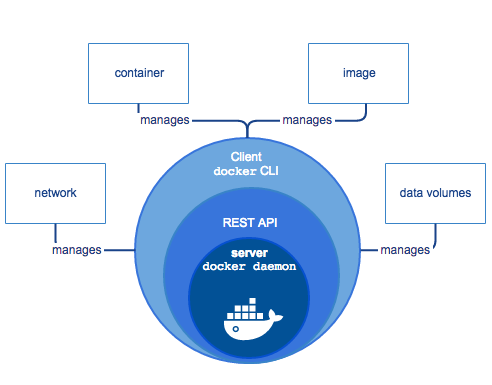 |
Docker architecture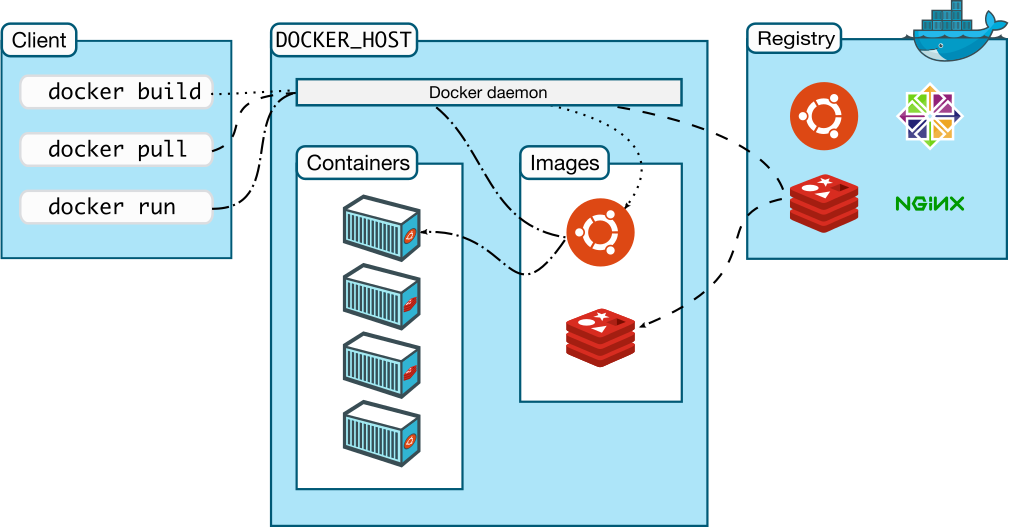 |
Basic concepts
- Docker is written in Go and takes advantage of several features of the Linux kernel to deliver its functionality.
- The Docker daemon (dockerd) listens for Docker API requests and manages Docker objects.
- A container is a runnable instance of an image. When you run a container, Docker creates a set of namespaces
(each provides a layer of isolation) for that container:
pid namespace: Process isolation (PID: Process ID).net namespace: Managing network interfaces (NET: Networking)ipc namespace: Managing access to IPC resources (IPC: InterProcess Communication)mnt namespace: Managing filesystem mount points (MNT: Mount)uts namespace: Isolating kernel and version identifiers. (UTS: Unix Timesharing System)
- A cgroup (control group) limits an application to a specific set of resources. Control groups allow Docker Engine to share available hardware resources to containers and optionally enforce limits and constraints. For example, you can limit the memory available to a specific container.
- An image is a read-only template with instructions for creating a Docker container. Often, an image is based on another image, with some additional customization
- The Docker client (docker) is the primary way that many Docker users interact with Docker.
- A Docker registry stores Docker images. Docker Hub is a public registry.
- To build your own image, you create a Dockerfile. Each instruction creates a layer in the image. When you change the Dockerfile and rebuild the image, only those layers which have changed are rebuilt. This is part of what makes images so lightweight, small, and fast, when compared to other virtualization technologies.
- Services allow you to scale containers across multiple Docker daemons, which all work together as a
swarm with multiple managers and workers.
Install
On Windows10
- On ThinkPad (Virtualization enabled) I'm using Docker Desktop for Windows described in Docker for Windows
- On another machine I'm using Docker Toolbox on Windows
Docker Desktop requires Windows 10 Pro or Enterprise version 15063 to run.In this case, you must install Docker Toolbox, which relies on VirtualBox instead of Hyper-V
Docker Toolbox will install VirtualBox if not already present in your system and will create a virtual machine named
On RaspberryPi
Raspberry Pis use the ARM architecture, and as a result, won't be compatible with all containers out of the box. Images will need to be built from anSee Happy Pi Day with Docker and Raspberry Pi.
| Install |
curl -sSL https://get.docker.com | sh |
| Add permission to run Docker Commands | sudo usermod -aG docker pi
|
| Test Docker installation | docker run hello-world |
| Install proper dependencies | sudo apt-get install -y libffi-dev libssl-dev sudo apt-get install -y python3 python3-pip sudo apt-get remove python-configparser |
| Install |
sudo pip3 install docker-compose |
Docker Image Searching
| Search an image on a Docker registry | docker search [search term] |
Docker Image Commands
See also How to Create Docker Image with Dockerfile or Dockerfile reference.| Create an image from a Dockerfile | docker build [URL] |
| builds an image from a Dockerfile in the current directory and tags the image | docker build -t |
| Pull an image from a registry | docker pull [IMAGE] |
| Push an image to a registry | docker push [IMAGE] |
| Create an image from a tarball | docker import [URL/FILE] |
| Create an image from a container | docker commit [CONTAINER] [NEW_IMAGE_NAME] |
| Remove an image | docker rmi [IMAGE] |
| Load an image from a tar archive or stdin | docker load [TAR_FILE/STDIN_FILE] |
| Save an image to a tar archive, streamed to STDOUT with all parent layers, tags, and versions | docker save [IMAGE] > [TAR_FILE] |
Docker Commands for Container and Image Information
| List running containers | docker ps |
| lists both running containers and ones that have stopped | docker ps -a |
| List the logs from a running container | docker logs [CONTAINER] |
| List low-level information on Docker objects | docker inspect [OBJECT_NAME/ID] |
| List real-time events from a container | docker events [CONTAINER] |
| Show port (or specific) mapping for a container | docker port [CONTAINER] |
| Show running processes in a container | docker top [CONTAINER] |
| Show live resource usage statistics of containers | docker stats [CONTAINER] |
| Show changes to files (or directories) on a filesystem | docker diff [CONTAINER] |
| List all images that are locally stored with the docker engine | docker image ls |
| Show the history of an image | docker history [IMAGE] |
| Save-(copy)-restore an image | docker save qak20basicrobot:latest > qak20basicrobot.tar docker load < qak20basicrobot.tar |
Docker Container Commands
| Create a container (without starting it) | docker create [IMAGE] |
| Rename an existing container | docker rename [CONTAINER_NAME] [NEW_CONTAINER_NAME] |
| Run a command in a new container | docker run [IMAGE] [COMMAND] docker run --rm [IMAGE] |
| Starts a container, allocates a pseudo-TTY connected to the container's stdin, and creates an interactive bash shell in the container | docker run -it [IMAGE] |
| Creates, starts, and runs a command inside the container. Once it executes the command, the container is removed | docker run -it-rm [IMAGE] |
| Starts a container in background | docker run -d [IMAGE] docker exec -ti [CONTAINER] [CMD] |
| Delete a container (if it is not running) | docker rm [CONTAINER] docker rm -f [CONTAINER] |
| Update the configuration of one or more containers | docker update [CONTAINER] |
| Copy files/folders between a container and the local filesystem | docker cp [OPTIONS] CONTAINER:SRC_PATH DEST_PATH|- docker cp [OPTIONS] SRC_PATH|- CONTAINER:DEST_PATH |
Starting and Stopping Containers
| Start a container | docker start [CONTAINER] |
| Stop a running container | docker stop [CONTAINER] |
| Stop a running container and start it up again | docker restart [CONTAINER] |
| Pause processes in a running container | docker pause [CONTAINER] |
| Unpause processes in a running container | docker unpause [CONTAINER] |
| Block a container until others stop (after which it prints their exit codes) | docker wait [CONTAINER] |
| Kill a container by sending a SIGKILL to a running container | docker kill [CONTAINER] |
| Attach local standard input, output, and error streams to a running container | docker attach [CONTAINER] |
Networks
See also How to Share Data Between Docker Containers| List networks | docker network ls |
| Remove one or more networks | docker network rm [NETWORK] |
| Show information on one or more networks | docker network inspect [NETWORK] |
| Connects a container to a network | docker network connect [NETWORK] [CONTAINER] |
| Disconnect a container from a network | docker network disconnect [NETWORK] [CONTAINER] |
| Disconnect a container from a network | docker exec -ti [CONTAINER] /etc/hosts |
Docker Compose
Docker Compose is a tool for defining and running multi-container Docker applications. Compose can be used in many different ways (see Compose Common use cases):- Development environments: The Compose file provides a way to document and configure all of the application’s service dependencies (databases, queues, caches, web service APIs, etc). Using the Compose command line tool you can create and start one or more containers for each dependency with a single command (docker-compose up).
- Automated testing environments: Automated end-to-end testing requires an environment in which to run tests. Compose provides a convenient way to create and destroy isolated testing environments for your test suite.
- Single host deployments: You can use Compose to deploy to a remote Docker Engine. The Docker Engine may be a single instance provisioned with Docker Machine or an entire Docker Swarm cluster.
About docker-compose.yml
A docker-compose.yml file specifies (see The definitive Guide to Docker compose) a set of rules expressed in multiple layers that are split using tab stops or spaces. A .yaml specification usually includes:- The version of the compose file
- The services which will be built
- All used volumes
- The networks which connect the different services
This allows you to change your application for different environments (e.g. staging, dev, and production) and helps you run admin tasks or tests against your application.
Almost every rule in a single docker-compose.yml configuration file replaces a specific Docker command. We can get dozens of configurations applied by Compose under the hood.
services:
frontend:
build:
Sometimes, the image we need for our service has already been published.Here, we build an image from the source code by reading its Dockerfile. The image name in conjunction with the build attribute, gives a name to the image once created, making it available to be used by other services. |
|
 |
|
| refer to containers' configuration |
services:
frontend:
build:
Sometimes, the image we need for our service has already been published.Here, we build an image from the source code by reading its Dockerfile. The image name in conjunction with the build attribute, gives a name to the image once created, making it available to be used by other services. |
create and start the containers, the networks, and the volumes defined in the configuration:
docker-compose upstart the services: docker-compose startstop - preserve containers, volumes, and networks, along with every modification made to them: docker-compose stopdestroy everything with only the exception of external volumes: docker-compose down |
|
There are different methods to provide those values to Compose:
docker run -d \
    -v /tmp/.X11-unix:/tmp/.X11-unix \
    -v /etc/localtime:/etc/localtime \
    -e DISPLAY=unix$DISPLAY \
|
services:
frontend:
build: |
define the communication rules between containers, and between a container and the host. A service can communicate with another service on the same network by simply referencing it by container name and port (for example network-qak202:8020), provided that we've made the port accessible through the expose keyword. It would also work without exposing, when the expose directive is already in the image Dockerfile. |
Docker containers communicate between themselves in networks created, implicitly or through configuration, by Docker Compose.
services:
  network-qak202:
    image: ...
    expose:
      - "8020"
    ports:
      - "8020:8020"
Port 8020 will now be visible from the host. Let us now make port 3000 of our two containers be available on ports 8080 and 8081 in the host. services:
network-qak202:
image: ...
ports:
- "8020:8020"
frontend:
build:
This powerful mechanism allows us to run different containers exposing the same ports without collisions.
|
allow to create a dependency chain between our services, so that some services get loaded before (and unloaded after) other ones |
services:
frontend:
build:
Compose will not wait for the basicrobot service to finish loading before starting the frontend service: it will simply wait for it to start.
For more advanced control, eee
Control startup and shutdown order in Compose
|
a shared directory in the host, visible from some or all containers. There are three types of volumes:
Host volumes also allow us to specify an existing folder in the host. |
|
define additional virtual networks to segregate our containers |
services:
  network-example-service:
    image: karthequian/helloworld:latest
    networks:
      - my-shared-network
    ...
  another-service-in-the-same-network:
    image: alpine:latest
    networks:
      - my-shared-network
    ...
  another-service-in-its-own-network:
    image: alpine:latest
    networks:
      - my-private-network
    ...
networks:
  my-shared-network: {}
my-private-network: {} |
docker run --name dcs -p8039:8039/tcp -p8039:8039/udp dcsender docker run --name dcr -p8037:8037/tcp -p8037:8037/udp dcreceiver |
Monitoring containers
https://www.atatus.com/blog/docker-container-monitoring-tools/
By AN - DISI - Unibo